HR managers who still rely on manual time tracking know the frustration all too well—paper timesheets riddled with errors, buddy punching that inflates labor costs, and hours spent reconciling attendance records before every pay cycle. These inefficiencies don’t just waste time; they erode trust in payroll accuracy and expose organizations to compliance risks. A time clock with GPS tracking offers a modern alternative, automatically capturing when and where employees clock in while eliminating the guesswork that plagues traditional methods.
Yet purchasing a GPS time clock is only half the equation. The real challenge lies in connecting that attendance data to your payroll system so hours flow seamlessly from clock-in to paycheck without manual intervention. When this integration breaks down, HR teams end up re-keying data, chasing discrepancies, and delaying payroll runs. This article provides a clear, step-by-step guide for HR managers who want to bridge the gap between GPS-based attendance tracking and payroll processing—reducing errors, saving administrative hours, and building a more reliable workforce management workflow.
Understanding the Modern Time Clock with GPS Tracking
A GPS time clock is a workforce management tool that records employee punch-ins and punch-outs while simultaneously capturing their geographic coordinates. Unlike traditional punch cards or PIN-based terminals fixed to a wall, these systems use satellite positioning to verify that an employee is physically present at an authorized work location when they log their hours. This evolution from static hardware to location-aware tracking addresses a fundamental gap in attendance management—proving not just when someone clocked in, but where they did it.
For HR managers overseeing distributed teams, field workers, or multi-site operations, this capability transforms how employee hours are managed. Location verification virtually eliminates buddy punching because a colleague across town cannot clock in on someone else’s behalf. Time theft from early punches or unauthorized locations drops significantly when every entry carries a GPS stamp. Perhaps most importantly, the system automates data collection entirely—hours, locations, and timestamps flow into a central database without anyone filling out a form or transcribing numbers from a sheet.
Key Components of a GPS Time Tracking System
The hardware side typically involves smartphones running a dedicated app or purpose-built tablets and kiosks equipped with GPS receivers. These devices capture satellite signals to determine precise coordinates at the moment of each clock event. On the software side, a cloud-based platform aggregates all punch data, applies geofencing rules that define acceptable work boundaries, and organizes records by employee, shift, and project. The combination produces real-time attendance data that gives HR managers immediate visibility into who is working, where they are, and whether any anomalies—like an out-of-bounds punch—require attention. This instant insight replaces the lag of manual reporting with a live operational picture.
Essential Features of a Smart Attendance System for Seamless Operations
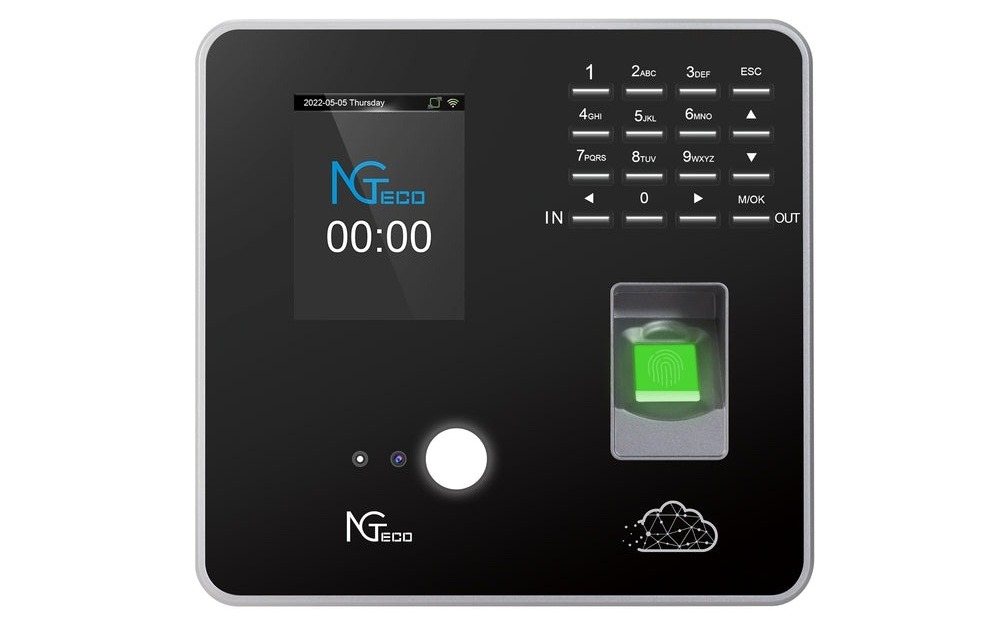
When evaluating a smart attendance system that will eventually feed data into payroll, HR managers should look beyond basic clock-in functionality and prioritize features that ensure reliable, continuous operation. Biometric verification—whether fingerprint scanning, facial recognition, or a combination—adds an authentication layer that confirms identity alongside location. Hardware manufacturers like NGteco have developed devices that combine biometric sensors with GPS capabilities in a single unit, streamlining deployment for organizations that need both identity verification and location validation. Mobile app compatibility extends tracking to field employees who never visit a central office, allowing them to punch in from job sites, client locations, or delivery routes while GPS validates their position. Offline functionality matters too; a system that queues punch data locally and syncs once connectivity returns prevents gaps in attendance records for crews working in basements, rural areas, or structures with poor signal penetration.
Beyond individual features, the system’s ability to deliver real-time attendance data and maintain stable network connections determines whether payroll integration will function smoothly or create bottlenecks. Two capabilities deserve particular attention from HR teams planning an integration project.
Why Dual-Band WiFi Matters for Reliability
Dual-band WiFi support allows time clock devices to operate on both 2.4 GHz and 5 GHz frequencies, automatically selecting the less congested band for data transmission. In busy warehouses, retail floors, or office buildings where dozens of devices compete for bandwidth, a single-band connection often drops packets or delays syncing. When a time clock loses connectivity mid-transmission, punch records can arrive late or incomplete—creating exactly the kind of discrepancy that forces HR staff into manual reconciliation. Devices equipped with dual-band WiFi maintain consistent uploads to the cloud platform, ensuring that every clock event reaches the central database promptly and intact, ready for payroll processing.
Leveraging Real-Time Attendance Data for Proactive Management
Access to real-time attendance data shifts HR from a reactive role—discovering problems days later during payroll prep—to a proactive one. When a dashboard shows that three technicians haven’t clocked in thirty minutes after their shift started, a manager can intervene immediately rather than discovering the absence at week’s end. Similarly, real-time visibility into overtime accumulation lets HR flag potential budget overruns before they compound. This instant feedback loop also simplifies the payroll integration itself: because data arrives continuously and anomalies surface quickly, the records flowing into payroll are already clean, validated, and far less likely to trigger post-processing corrections.
Pre-Integration Assessment: Evaluating Your Current Payroll Setup
Before connecting any GPS time clock to your payroll system, you need a thorough understanding of what your existing payroll software can accept and how it processes incoming data. Start by determining whether your payroll platform offers an open API—this is the gateway that allows external systems to push attendance records directly into payroll without manual file uploads. Platforms like ADP, Gusto, and Paychex provide well-documented APIs, while some legacy systems may only accept flat-file imports in CSV or XML formats. Knowing this distinction early shapes your entire integration approach.
Next, examine the data formats your payroll system expects. Map out required fields: employee identifiers, date stamps, total hours, overtime classifications, and department codes. If your GPS time clock exports data using different field names or structures, you’ll need middleware or custom mapping to translate between the two. Security protocols also demand attention—confirm that your payroll system supports encrypted data transfers (TLS/SSL) and that any API keys or authentication tokens meet your organization’s IT security standards. This groundwork prevents failed transfers and protects sensitive employee compensation data throughout the integration.
Compatibility Checks and Data Migration Planning
Run a compatibility test by exporting a sample attendance file from your GPS time clock and attempting a manual import into your payroll system’s sandbox or test environment. This reveals formatting conflicts, missing fields, or character encoding issues before they disrupt a live payroll run. Document every mismatch you find and create a resolution plan for each. For historical data migration, decide how far back you need attendance records in the new system—typically one to two pay periods provides enough overlap to validate accuracy. Schedule migration during a low-activity window, and always maintain a backup of original records so you can roll back if discrepancies surface during parallel processing.
Step-by-Step Guide to Integrating GPS Time Clocks with Payroll Systems
With your assessment complete and compatibility confirmed, the actual integration process follows a logical sequence that builds from system configuration through live deployment. Each step depends on the previous one, so resist the temptation to skip ahead—shortcuts here typically surface as payroll errors weeks later.
Step 1: Selecting and Configuring Your GPS Time Clock Software
Choose a GPS time clock platform that explicitly lists your payroll provider among its supported integrations or offers a flexible API that can connect to custom endpoints. During initial configuration, enroll every active employee with their unique identifier—matching the employee ID format your payroll system uses prevents mapping headaches downstream. Define geofencing boundaries for each work location, setting acceptable radii that account for GPS drift without being so generous that off-site punches slip through. Configure pay rules within the time clock software itself, including overtime thresholds, break deductions, and rounding policies, so the data exported already reflects your organization’s compensation logic.
Step 2: Establishing the Data Pipeline for Real-Time Attendance Data
Connect your time clock platform to your payroll system by activating the integration module or configuring API credentials. Establish the transfer frequency—real-time webhook pushes work best for organizations that need continuous visibility, while scheduled batch exports at the end of each pay period suffice for smaller teams. Define which data fields travel through the pipeline: employee ID, clock-in timestamp, clock-out timestamp, GPS coordinates, total regular hours, and overtime hours. Confirm that the export format aligns with what your payroll system ingests, whether that’s JSON payloads via API or structured CSV files dropped into a secure folder.
Step 3: Configuring Payroll Integration Parameters
Inside your payroll platform, map each incoming attendance field to its corresponding payroll field. Employee ID links to the correct pay profile, regular hours populate standard earnings, and overtime hours route to the appropriate pay multiplier. Set up automation rules that trigger payroll calculations upon data receipt, eliminating the need for someone to manually initiate imports each cycle. Configure exception handling so that flagged punches—missing clock-outs, out-of-bounds locations, or hours exceeding daily maximums—route to an approval queue rather than blocking the entire batch.
Step 4: Testing, Validation, and Go-Live
Run a parallel payroll cycle where you process attendance through both your legacy method and the new integrated pipeline simultaneously. Compare outputs line by line for a representative sample of employees, including salaried staff, hourly workers, and anyone with complex schedules. Investigate every discrepancy until you identify whether the root cause is a mapping error, a rounding rule mismatch, or a timing issue in data transmission. Once two consecutive test cycles produce matching results, launch a pilot with a single department or location before expanding company-wide. Collect feedback from managers and payroll staff during the pilot to catch usability issues that technical testing alone won’t reveal.
Best Practices and Common Challenges in Payroll Integration
Once your integration is live, maintaining its reliability requires ongoing attention. Schedule monthly audits where you compare a random sample of GPS punch records against corresponding payroll entries—catching drift early prevents compounding errors across multiple pay periods. Establish clear escalation paths for exception handling so flagged punches don’t sit in approval queues long enough to delay payroll runs. On the employee side, resistance often stems from privacy concerns about GPS tracking; address this transparently by communicating that location data is captured only during clock events, not continuously, and that it protects honest workers from false accusations as much as it deters time theft. Data discrepancies between systems usually trace back to timezone mismatches, rounding rule conflicts, or duplicate employee records created during migration—document these root causes and build automated checks that catch them before payroll processing begins.
Ensuring Data Accuracy and Security
Conduct quarterly reviews of field mappings between your smart attendance system and payroll platform, especially after either vendor releases updates that may alter data structures. Implement role-based access controls so only authorized payroll staff can modify integration settings or approve exception overrides. Encrypt all data in transit and at rest, rotate API credentials on a regular schedule, and maintain audit logs that record every data transfer between systems. These practices protect sensitive compensation information while preserving the accuracy that makes automated payroll integration worthwhile.
Building a Scalable GPS-to-Payroll Workflow for Long-Term Success
Integrating a GPS time clock with your payroll system eliminates the manual data entry, reconciliation headaches, and error-prone processes that consume HR managers’ time every pay cycle. When attendance records flow automatically from clock event to paycheck calculation, you reclaim administrative hours, reduce costly payroll mistakes, and build a transparent system that employees and auditors alike can trust. The steps outlined here—from assessing your current payroll setup and establishing a reliable data pipeline to testing thoroughly before full deployment—provide a repeatable framework that scales whether you manage fifty employees or five thousand.
Choosing a smart attendance system with real-time attendance data capabilities and dual-band WiFi connectivity ensures that the foundation of your integration remains stable and responsive, even in challenging environments where connectivity falters. These aren’t luxury features; they’re operational necessities that prevent the data gaps and sync failures which undermine automation. As workforce distribution continues to grow—with more remote sites, mobile crews, and hybrid schedules—HR teams that invest in this integration now position themselves to manage complexity without adding headcount. The payoff is straightforward: accurate pay, less administrative burden, and a workforce management process that runs on verified data rather than assumptions.
